
scSidekick - Getting Started: PrepObject, ShowColors, GetColors
01_getting_started.RmdOverview
scSidekick is built around one idea: configure your project once, and every downstream step inherits that configuration automatically - not just colors and layouts, but a full reproducibility trail.
After a single setup call, the following come for free as byproducts of ordinary plotting and analysis:
-
Consistent, publication-ready figures - one palette
and factor ordering shared across every plot, single-cell and spatial
alike, with no repeated
scale_color_manual()orgroup.byarguments. -
A plain-text
.legendsidecar written next to every saved figure, describing exactly what was plotted - so you never reverse-engineer a figure at paper time (see Reporting & Utilities). -
A draft methods paragraph reconstructed from the
Seurat command history with
ExtractMethods(). -
A recoverable session log -
start_session_logger()captures the commands and figures of a session so an interrupted analysis can be rebuilt, andsummarize_r_session()turns it into a clean report and a runnable R script. -
A one-call slide deck -
create_analysis_pptx()assembles your saved figures into a sectioned PowerPoint for the next lab meeting.
PrepObject() is the engine that makes all of this
possible. Call it once after clustering and it stores a color palette,
factor-level ordering, an output directory, and default plotting
parameters directly inside the Seurat object at
seurat_object@misc$nk_settings. Every downstream scSidekick
function reads from that slot when its own arguments are left
NULL - so you set your project’s look and behavior a single
time, and never repeat it. Learn PrepObject() here; the
rest of the package builds on it.
In short: run PrepObject() once ->
consistent figures, auto-written legends, a methods paragraph, a
recoverable session log, and a slide deck all follow automatically.
Installation and demo data
if (!require("devtools", quietly = TRUE)) install.packages("devtools")
devtools::install_github("nourabdelfattah/scSidekick")
We use bmcite, a bone marrow CITE-seq dataset from
SeuratData. It is small (~30 k cells) and already comes with rich
metadata - lane, donor,
celltype.l1, and celltype.l2 - so we can
demonstrate multi-variable workflows without manufacturing fake
columns.
1. Basic PrepObject call
PrepObject() registers one or more metadata variables
and assigns each level a distinct color from scSidekick’s built-in
palette. Pass a character vector to handle all your grouping columns at
once.
bmcite <- PrepObject(bmcite,
  variables = c("lane", "donor", "celltype.l1", "celltype.l2"))
After this call bmcite@misc$nk_settings holds a color
map for each variable. Each variable gets its own independent palette
and levels are stored as ordered factors, so axes and legends always
appear in a consistent order. Inspect them with
ShowColors() or GetColors() (see below).
2. Setting default plotting parameters
group.by, split.by,
output_dir, object_name, and
subset_name store package-wide defaults that every plotting
function inherits when those arguments are left NULL.
bmcite <- PrepObject(bmcite,
  variables   = c("lane", "donor", "celltype.l1", "celltype.l2"),
  group.by    = "celltype.l1",
  split.by    = "donor",
  output_dir  = "./bmcite_Analysis/Figures",
  object_name = "bmcite",
  subset_name = "AllCells")
With these stored, a bare PlotDimPlots(bmcite) will
group by cell type, split by donor, and save to the specified folder -
no repeated arguments.
3. Standard Seurat processing
You can add new variables (like seurat_clusters) to
PrepObject later, after running the clustering pipeline.
Here we process the object and use Determine_nDims() to
pick the number of dimensions automatically.
Determine_nDims() applies two heuristics to the PCA
variance explained and returns the more conservative (lower) of the two.
Blue numbers are the selected dimensions; orange are discarded.
result <- Determine_nDims(bmcite, reduction = "pca")
result$plot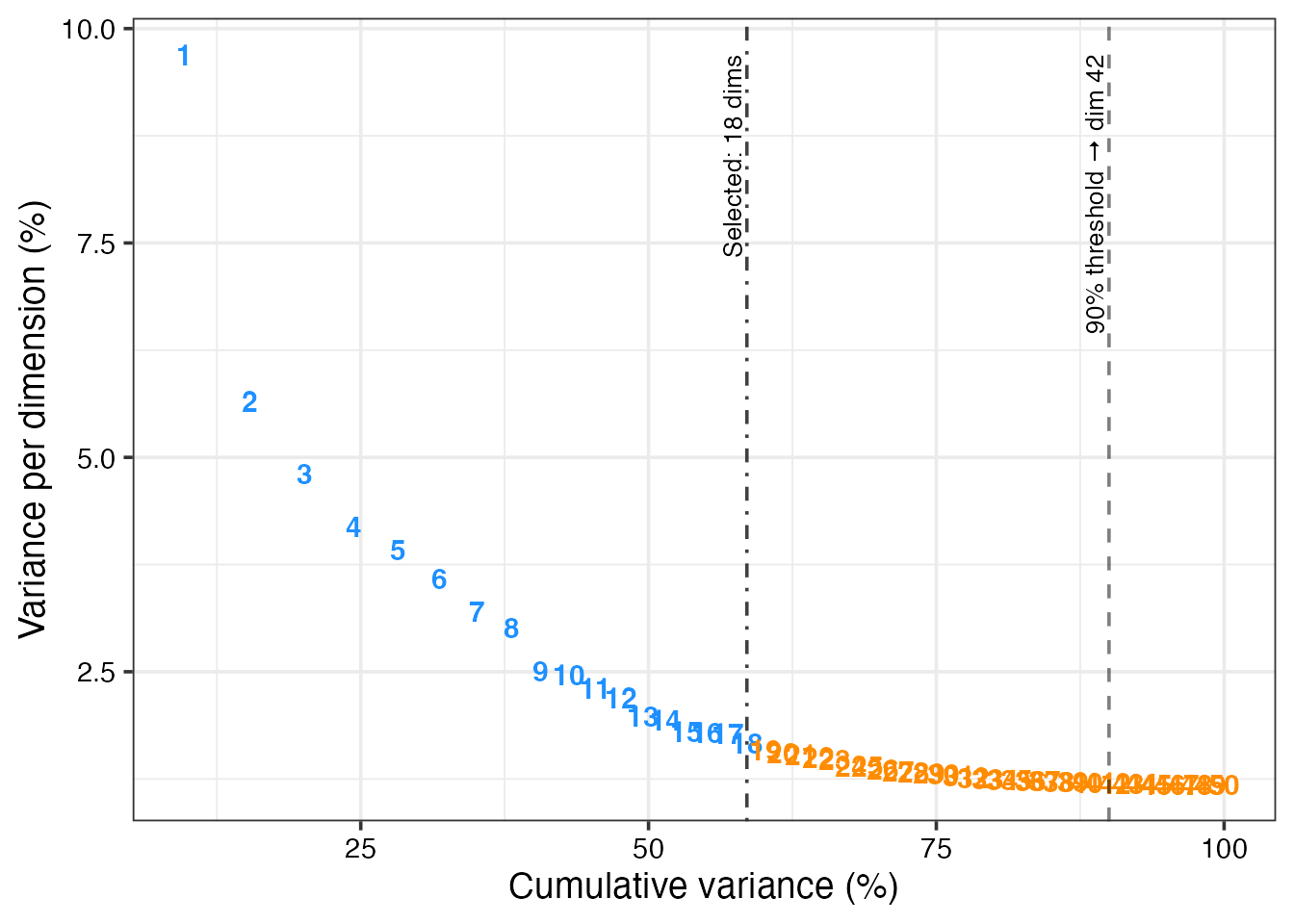
4. Inspect registered colors with ShowColors()
ShowColors() renders a swatch grid for every variable
stored in nk_settings - one panel per variable, levels on
the y-axis. This is the fastest sanity check before generating
figures.
ShowColors(bmcite)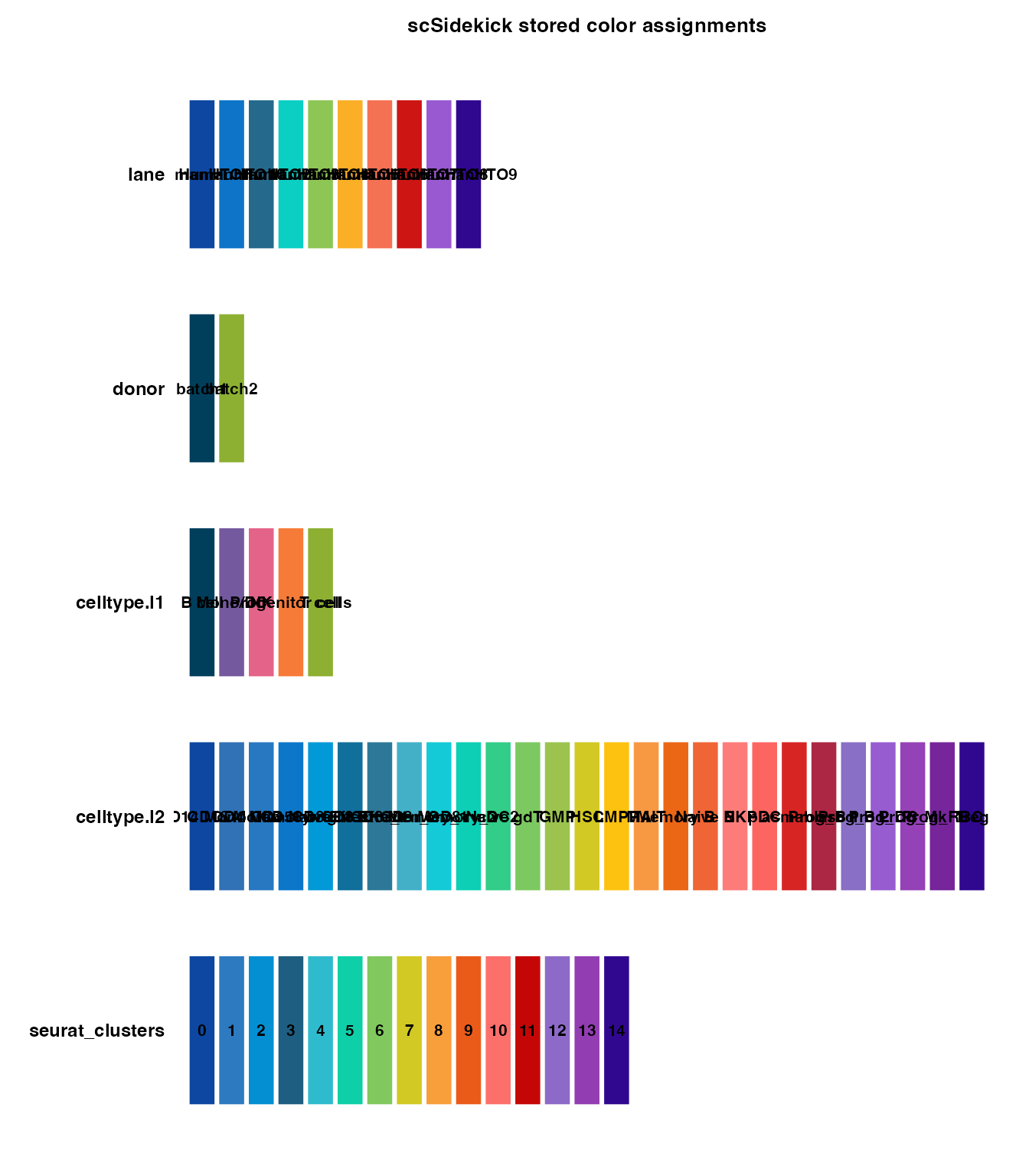
5. Custom colors
Override any variable’s palette with a named vector. Any level you omit falls back to the auto-palette, so you only specify the colors you care about.
my_cols <- c("CD4 T" = "#E41A1C", "CD8 T" = "#377EB8", "NK" = "#4DAF4A",
             "B"     = "#984EA3", "Mono"  = "#FF7F00")

bmcite <- PrepObject(bmcite,
  variables     = "celltype.l1",
  custom_colors = list(celltype.l1 = my_cols))
6. Controlling factor level order
var_levels sets the display order for any variable,
controlling legend entries, axis ticks, and split panels. Levels you
don’t list are appended at the end.
bmcite <- PrepObject(bmcite,
  variables  = c("celltype.l1", "donor"),
  var_levels = list(
    celltype.l1 = c("CD4 T", "CD8 T", "NK", "B", "Mono", "DC", "other T"),
    donor       = c("d1", "d2", "d3", "d4", "d5", "d6", "d7", "d8")
  ))
7. Retrieving colors programmatically with
GetColors()
GetColors() returns the named color vector for a
variable, ready to pass into scale_color_manual() or any
scSidekick colors argument.
# Single variable
ct_cols <- GetColors(bmcite, "celltype.l1")
ct_cols
## B cell Mono/DC NK Progenitor cells
## "#003F5C" "#74599E" "#E46388" "#F77B38"
## T cell
## "#8DB032"## [1] "lane" "donor" "celltype.l1" "celltype.l2"
## [5] "seurat_clusters"8. Forcing a rebuild
Once PrepObject() has run, subsequent calls skip
re-computation unless you pass force = TRUE. Use this after
adding new metadata or changing cluster assignments.
bmcite$Assignment <- dplyr::case_when(
  bmcite$celltype.l1 == "CD4 T" ~ "Helper T",
  bmcite$celltype.l1 == "CD8 T" ~ "Cytotoxic T",
  TRUE ~ bmcite$celltype.l1
)

bmcite <- PrepObject(bmcite,
  variables = c("celltype.l1", "celltype.l2", "seurat_clusters", "Assignment"),
  force     = TRUE)
9. Recommended full pipeline
This is a reference workflow for a real multi-sample project. Every step uses a scSidekick function; the Seurat processing steps in the middle are standard. Nothing here runs - it is a template you copy and adapt.
library(scSidekick)
library(Seurat)
library(harmony)

# ── 1. Load raw 10x data ─────────────────────────────────────────────────────
SeuratObj <- LoadSamplesRNA(
  sample_dirs  = list.files("path/to/10x_dirs", full.names = TRUE),
  sample_names = c("HC1", "HC2", "AD1", "AD2"),
  metadata     = data.frame(
    Sample = c("HC1", "HC2", "AD1", "AD2"),
    Group  = c("HC",  "HC",  "AD",  "AD"),
    Batch  = c(1, 1, 2, 2)
  )
)

# ── 2. QC ─────────────────────────────────────────────────────────────────────
PlotQCMetrics(SeuratObj, group.by = "Sample", output_dir = "./Figures/QC")
# Inspect the QC plots, then filter:
SeuratObj <- subset(SeuratObj, subset = DoubletStatus == "singlet" & miQC.keep == "keep")

# ── 3. Normalize & reduce ─────────────────────────────────────────────────────
SeuratObj <- NormalizeData(SeuratObj) %>%
  FindVariableFeatures(nfeatures = 2000) %>%
  ScaleData(vars.to.regress = c("S.Score", "G2M.Score", "percent.mt")) %>%
  RunPCA(npcs = 50)

# ── 4. (Optional) Harmony batch correction ────────────────────────────────────
SeuratObj <- harmony::RunHarmony(SeuratObj, group.by.vars = c("Sample", "Batch"))

# ── 5. Choose dimensions ──────────────────────────────────────────────────────
dims <- Determine_nDims(SeuratObj, reduction = "harmony")  # or "pca"
dims$plot   # inspect the elbow

SeuratObj <- RunUMAP(SeuratObj,       dims = 1:dims$n_dims, reduction = "harmony")
SeuratObj <- FindNeighbors(SeuratObj, dims = 1:dims$n_dims, reduction = "harmony")
SeuratObj <- FindClusters(SeuratObj,  resolution = 0.5)

# ── 6. Register colors & defaults ─────────────────────────────────────────────
SeuratObj <- PrepObject(SeuratObj,
  variables   = c("Sample", "Group", "seurat_clusters"),
  group.by    = "seurat_clusters",
  split.by    = "Sample",
  output_dir  = "./Figures",
  object_name = "MyProject")
ShowColors(SeuratObj)

# ── 7. Explore & visualize ────────────────────────────────────────────────────
PlotDimPlots(SeuratObj,
  group.by   = c("seurat_clusters", "Sample", "Group"),
  show_trend = TRUE)

# ── 8. Marker genes & annotation ──────────────────────────────────────────────
GroupHeatmap(SeuratObj, group.by = "seurat_clusters")

markers_df <- data.frame(
  Genes    = c("CD3E", "CD4", "CD8A", "NKG7", "CD79A", "LYZ", "S100A8"),
  CellType = c("T",    "T",   "T",    "NK",   "B",     "Mono","Mono")
)
SplitDotPlot(SeuratObj, markers_df = markers_df, group.by = "seurat_clusters")

de <- RunWilcoxAUC(SeuratObj, group.by = "seurat_clusters")
SeuratObj <- CellTypeAssignmentHelper(SeuratObj,
  markers        = de,
  cluster_column = "seurat_clusters",
  sctype_tissues = "Immune system",
  output_dir     = "./Figures/Annotation")

# ── 9. Finalize labels, update PrepObject ─────────────────────────────────────
SeuratObj$CellType <- dplyr::recode(SeuratObj$seurat_clusters,
  `0` = "CD4 T", `1` = "Monocyte", `2` = "NK", `3` = "B", ...)

SeuratObj <- PrepObject(SeuratObj,
  variables = c("seurat_clusters", "Sample", "Group", "CellType"),
  group.by  = "CellType",
  force     = TRUE)

PlotDimPlots(SeuratObj, group.by = c("CellType", "Sample", "Group"), show_trend = TRUE)

# ── 10. Feature maps ──────────────────────────────────────────────────────────
PlotFeaturePlots(SeuratObj,
  features = c("CD3E", "CD4", "CD8A", "NKG7", "CD79A", "LYZ"),
  split.by = "Sample")

# ── 11. Composition ───────────────────────────────────────────────────────────
PlotTrendLabeled(SeuratObj,
  stat.by  = "CellType",
  group.by = "Group",
  split.by = "Sample")

# ── 12. Pathway analysis ──────────────────────────────────────────────────────
RunGSEA(SeuratObj,
  group.by   = "CellType",
  split.by   = NULL,
  output_dir = "./Figures/Pathways")

# ── 13. Cell-cell communication ───────────────────────────────────────────────
cc_results <- RunCellChat(SeuratObj,
  cell.by    = "CellType",
  group.by   = "Group",
  groups     = c("HC", "AD"),
  output_dir = "./Figures/CellChat")

CompareCellChat(
  cellchat_list = cc_results,
  output_dir    = "./Figures/CellChat/Comparison")

# ── 14. Assemble slide deck ───────────────────────────────────────────────────
create_analysis_pptx(output_dir = "./Figures", object_name = "MyProject")
Parameter reference
| Parameter | Type | Default | Description |
|---|---|---|---|
variables |
character vector | required |
meta.data column names to register |
palettes |
character | "auto" |
Palette strategy; "auto" uses Nour18
|
reverse |
logical | FALSE |
Reverse color order for auto-assigned palettes |
custom_colors |
named list | list() |
Named color vectors per variable |
var_levels |
named list | list() |
Level orderings per variable |
group.by |
character | NULL |
Default grouping variable |
split.by |
character | NULL |
Default split variable |
output_dir |
character | NULL |
Default output directory |
object_name |
character | NULL |
Label used in saved filenames |
subset_name |
character | NULL |
Sub-label used in saved filenames |
force |
logical | FALSE |
Re-run even if nk_settings already exists |
See also
- Vignette 02:
Determine_nDims()in the context of dimensionality reduction - Vignette 03:
PlotDimPlots()- UMAP visualization using colors fromPrepObject - Vignette 07: Spatial Transcriptomics - the same settings drive
combined single-cell and spatial figures (
PlotMasterMaps,GenerateMasterGeneMaps) - Vignette 12: Reporting & Utilities - the reproducibility layer
in full:
ExtractMethods(), the auto-written.legendsidecars, the session logger,create_analysis_pptx(), and theNour_pal()/Nour_cols()palette utilities - Vignette 21:
AskSidekick()- an AI assistant that already knows this vignette and every function’s real arguments, and can read your object’s actual metadata columns and saved colors when you’re not sure which one to use - Example workflow: a full worked project end to end, from raw 10x data to a slide deck, using the settings this vignette introduces
Session info
## R version 4.3.1 (2023-06-16)
## Platform: aarch64-apple-darwin20 (64-bit)
## Running under: macOS 15.6
##
## Matrix products: default
## BLAS:   /Library/Frameworks/R.framework/Versions/4.3-arm64/Resources/lib/libRblas.0.dylib
## LAPACK: /Library/Frameworks/R.framework/Versions/4.3-arm64/Resources/lib/libRlapack.dylib;  LAPACK version 3.11.0
##
## locale:
## [1] en_US.UTF-8/en_US.UTF-8/en_US.UTF-8/C/en_US.UTF-8/en_US.UTF-8
##
## time zone: America/Chicago
## tzcode source: internal
##
## attached base packages:
## [1] stats     graphics  grDevices utils     datasets  methods   base
##
## other attached packages:
##  [1] dplyr_1.1.4               stxBrain.SeuratData_0.1.2
##  [3] pbmc3k.SeuratData_3.1.4   panc8.SeuratData_3.0.2
##  [5] ifnb.SeuratData_3.1.0     bmcite.SeuratData_0.3.0
##  [7] SeuratData_0.2.2          Seurat_5.2.1
##  [9] SeuratObject_5.1.0        sp_2.1-3
## [11] scSidekick_1.2.0
##
## loaded via a namespace (and not attached):
##   [1] RColorBrewer_1.1-3     rstudioapi_0.16.0      jsonlite_2.0.0
##   [4] magrittr_2.0.3         spatstat.utils_3.1-0   farver_2.1.2
##   [7] rmarkdown_2.29         fs_1.6.6               ragg_1.4.0
##  [10] vctrs_0.6.5            ROCR_1.0-11            spatstat.explore_3.2-7
##  [13] htmltools_0.5.8.1      sass_0.4.10            sctransform_0.4.1
##  [16] parallelly_1.37.1      KernSmooth_2.23-22     bslib_0.9.0
##  [19] htmlwidgets_1.6.4      desc_1.4.3             ica_1.0-3
##  [22] plyr_1.8.9             plotly_4.10.4          zoo_1.8-14
##  [25] cachem_1.1.0           igraph_2.0.3           mime_0.13
##  [28] lifecycle_1.0.4        pkgconfig_2.0.3        Matrix_1.6-5
##  [31] R6_2.6.1               fastmap_1.2.0          fitdistrplus_1.1-11
##  [34] future_1.33.2          shiny_1.11.1           digest_0.6.37
##  [37] colorspace_2.1-1       patchwork_1.3.1        tensor_1.5
##  [40] RSpectra_0.16-1        irlba_2.3.5.1          textshaping_0.3.7
##  [43] labeling_0.4.3         progressr_0.14.0       spatstat.sparse_3.0-3
##  [46] httr_1.4.7             polyclip_1.10-6        abind_1.4-8
##  [49] compiler_4.3.1         withr_3.0.2            S7_0.2.0
##  [52] fastDummies_1.7.3      highr_0.10             MASS_7.3-60.0.1
##  [55] rappdirs_0.3.3         tools_4.3.1            lmtest_0.9-40
##  [58] otel_0.2.0             httpuv_1.6.16          future.apply_1.11.2
##  [61] goftest_1.2-3          glue_1.8.0             nlme_3.1-164
##  [64] promises_1.5.0         grid_4.3.1             Rtsne_0.17
##  [67] cluster_2.1.6          reshape2_1.4.4         generics_0.1.4
##  [70] gtable_0.3.6           spatstat.data_3.0-4    tidyr_1.3.1
##  [73] data.table_1.15.4      spatstat.geom_3.2-9    RcppAnnoy_0.0.22
##  [76] ggrepel_0.9.6          RANN_2.6.1             pillar_1.11.0
##  [79] stringr_1.5.1          spam_2.10-0            RcppHNSW_0.6.0
##  [82] later_1.4.2            splines_4.3.1          lattice_0.22-6
##  [85] survival_3.5-8         deldir_2.0-4           tidyselect_1.2.1
##  [88] miniUI_0.1.1.1         pbapply_1.7-2          knitr_1.45
##  [91] gridExtra_2.3          scattermore_1.2        xfun_0.52
##  [94] matrixStats_1.2.0      stringi_1.8.7          lazyeval_0.2.2
##  [97] yaml_2.3.10            evaluate_0.23          codetools_0.2-20
## [100] tibble_3.3.0           cli_3.6.5              uwot_0.1.16
## [103] xtable_1.8-4           reticulate_1.42.0      systemfonts_1.3.2
## [106] jquerylib_0.1.4        dichromat_2.0-0.1      Rcpp_1.1.0
## [109] globals_0.16.3         spatstat.random_3.2-3  png_0.1-8
## [112] parallel_4.3.1         pkgdown_2.1.3          ggplot2_4.0.3
## [115] dotCall64_1.1-1        listenv_0.9.1          viridisLite_0.4.2
## [118] scales_1.4.0           ggridges_0.5.6         purrr_1.0.4
## [121] crayon_1.5.2           rlang_1.1.6            cowplot_1.2.0.9000