
scSidekick - Spatial Transcriptomics: PlotSpatialDimPlots, PlotSpatialFeaturePlots, PlotMasterMaps
07_spatial.RmdOverview
scSidekick’s three spatial plotting functions mirror their scRNA-seq counterparts but render expression and metadata directly on the tissue image:
-
PlotSpatialDimPlots()- color spots by a metadata variable (e.g. cluster, condition, spatial domain). Long-form alias:GenerateSpatialDimMaps(). -
PlotSpatialFeaturePlots()- color spots by gene expression. Long-form alias:GenerateSpatialFeatureMaps(). -
PlotMasterMaps()- combined figure: tissue image + gene expression panels + cluster-colored UMAP side by side. Long-form alias:GenerateMasterGeneMaps().
All three functions accept group.by,
split.by, layout_method, and
output_dir with the same conventions as the scRNA-seq
equivalents.
Demo dataset - mouse brain (Visium)
library(scSidekick)
library(Seurat)
library(SeuratData)

#InstallData("stxBrain")
brain1 <- LoadData("stxBrain", type = "anterior1")
brain1 <- SCTransform(brain1, assay = "Spatial", verbose = FALSE)

brain2 <- LoadData("stxBrain", type = "posterior1")
brain2 <- SCTransform(brain2, assay = "Spatial", verbose = FALSE)
brain<- merge(brain1, brain2)

# Standard processing
DefaultAssay(brain) <- "SCT"
VariableFeatures(brain) <- c(VariableFeatures(brain), VariableFeatures(brain2))
brain <- RunPCA(brain, verbose = FALSE)
brain <- FindNeighbors(brain, dims = 1:30)
brain <- FindClusters(brain, verbose = FALSE)
brain <- RunUMAP(brain, dims = 1:30)

# Fake Celltypes column for  demos
set.seed(42)
brain$Celltypes <- sample(c("Celltype1","Celltype2","Celltype3","Celltype4"), ncol(brain), replace = TRUE)

# Register colors
brain <- PrepObject(brain,
  variables   = c("seurat_clusters", "Celltypes","region"),
  group.by    = "seurat_clusters",
  output_dir  = tempdir(),AutoSavePlots = F,
  object_name = "MouseBrain")
After PrepObject(), the cluster palette is stored and
will appear consistently across all spatial figures.
PlotSpatialDimPlots
1. Basic spatial cluster map
PlotSpatialDimPlots(brain,
  group.by = "seurat_clusters")
## scSidekick: Set `donor.by` in PrepObject() to include sample counts in figure legends and methods text.## Warning: `aes_string()` was deprecated in ggplot2 3.0.0.
## ℹ Please use tidy evaluation idioms with `aes()`.
## ℹ See also `vignette("ggplot2-in-packages")` for more information.
## ℹ The deprecated feature was likely used in the Seurat package.
## Please report the issue at <https://github.com/satijalab/seurat/issues>.
## This warning is displayed once every 8 hours.
## Call `lifecycle::last_lifecycle_warnings()` to see where this warning was
## generated.## Spatial DimMap: seurat_clusters - 1x2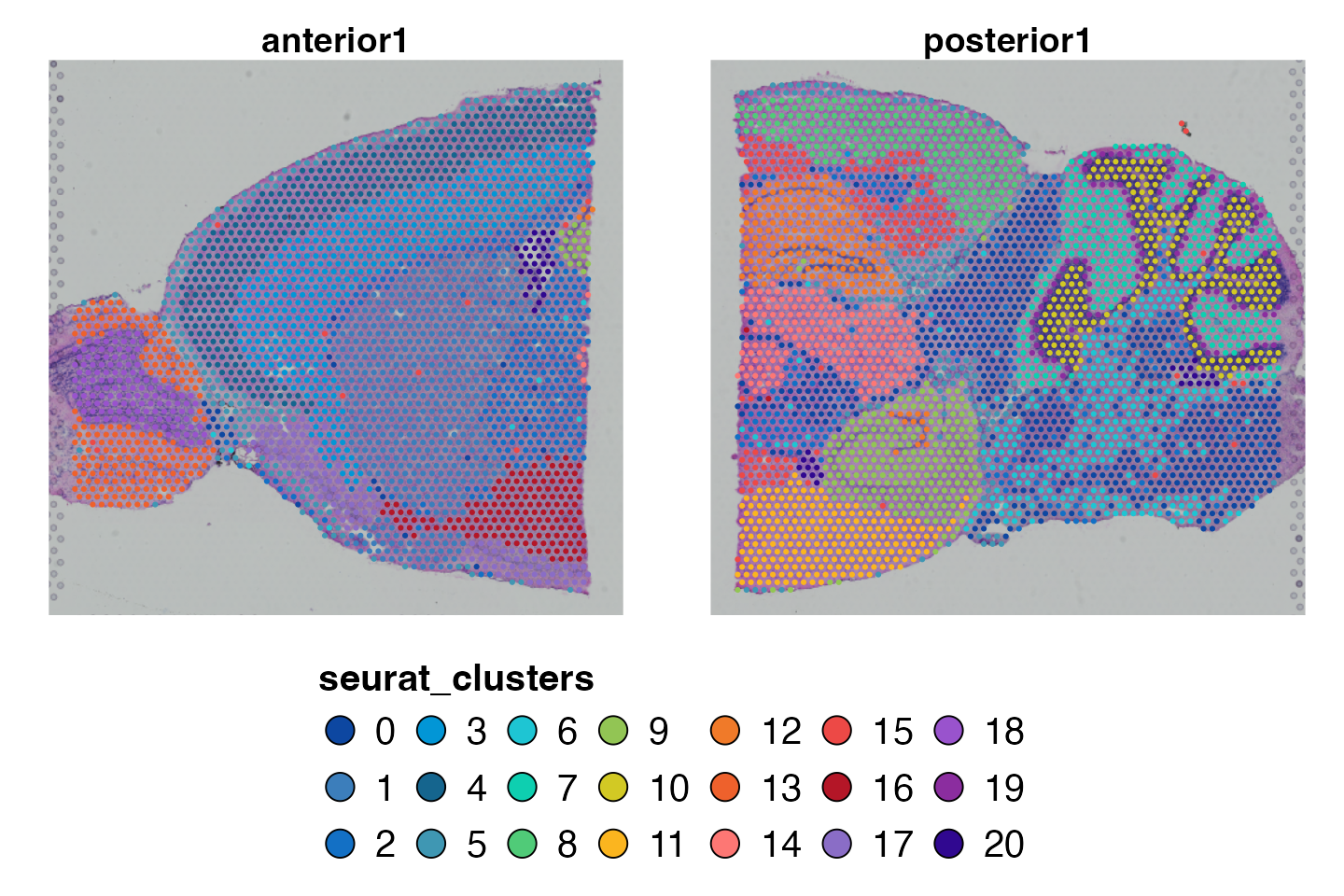
Each spot on the tissue section is colored by its cluster assignment.
The tissue H&E image is shown as a grey-scale background. A legend
maps colors to cluster numbers. The palette comes from
PrepObject.
2. Multiple variables - iterate
Passing a vector to group.by produces one spatial map
per variable.
PlotSpatialDimPlots(brain,
  group.by = c("seurat_clusters", "Celltypes"),join_plots = T,legendnrow = 2,)
## Spatial DimMap: seurat_clusters - 1x2## Spatial DimMap: Celltypes - 1x2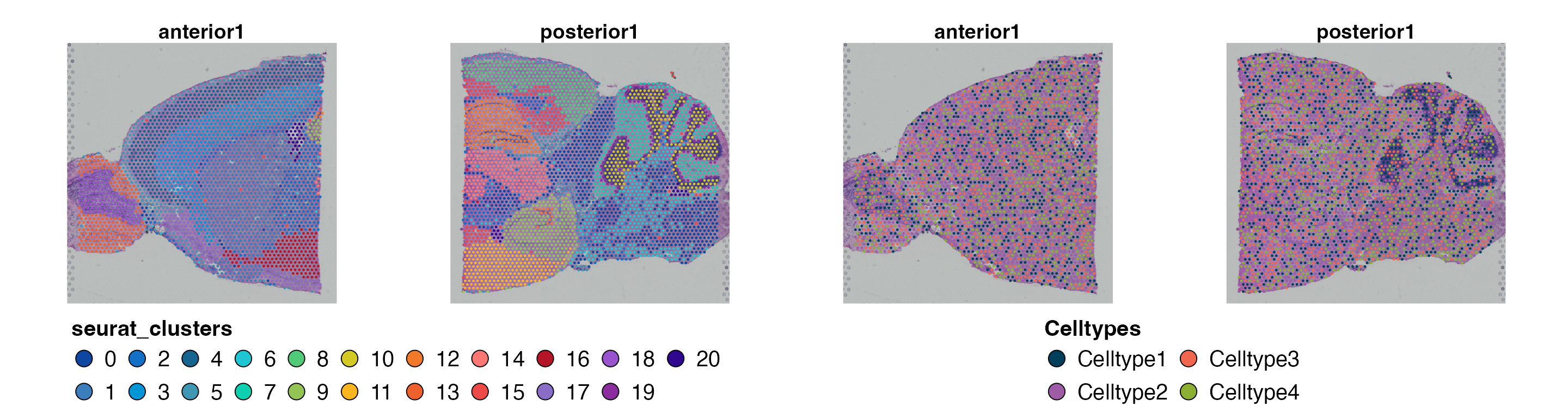
Two figures are generated: one showing spatial cluster distribution, one showing which spots are annotated WT vs KO.
3. Uniform spot size
By default Visium spot sizes are scaled by local spot density. Set
uniform_size = TRUE to use a fixed, equal size for all
spots - useful for comparing two sections where spot density
differs.
PlotSpatialDimPlots(brain,
  group.by     = "seurat_clusters",
  uniform_size = TRUE)
## Spatial DimMap: seurat_clusters - 1x2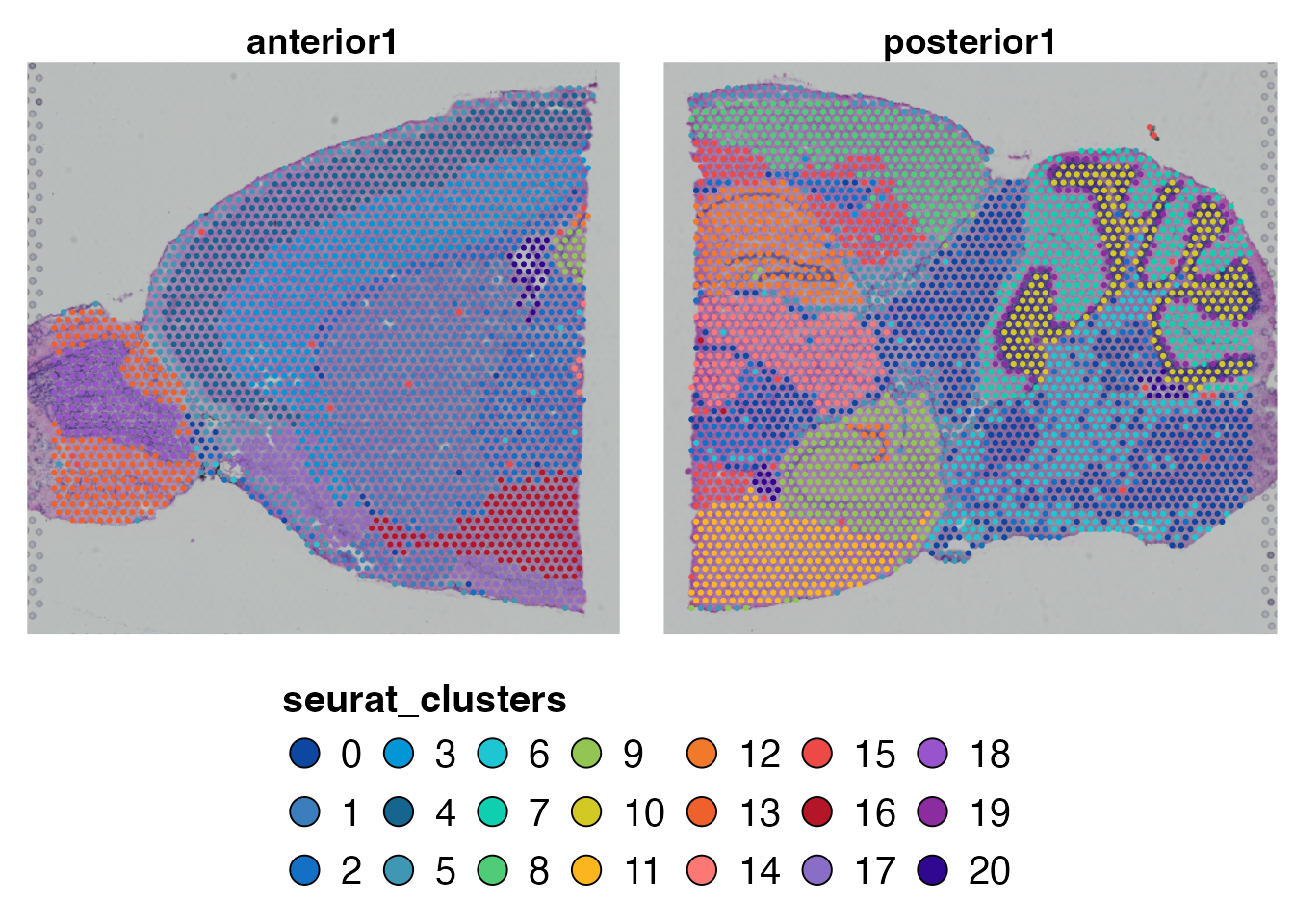
4. Metadata-driven layout with layout_method
layout_method = "metadata" uses row_var to
stack multiple spatial maps vertically, one row per level of
row_var. Useful when you have multiple tissue sections or
ROIs stored in the same object.
#Lets first generate an object where you have multiple conditions/replicates
brain$rep=1
brain2=brain
brain2$rep=2
braindouble=merge(brain,brain2)
PlotSpatialDimPlots(braindouble,
  group.by      = "seurat_clusters",
  layout_method = "metadata",
  row.by = "rep")
## Spatial DimMap: seurat_clusters - 2x2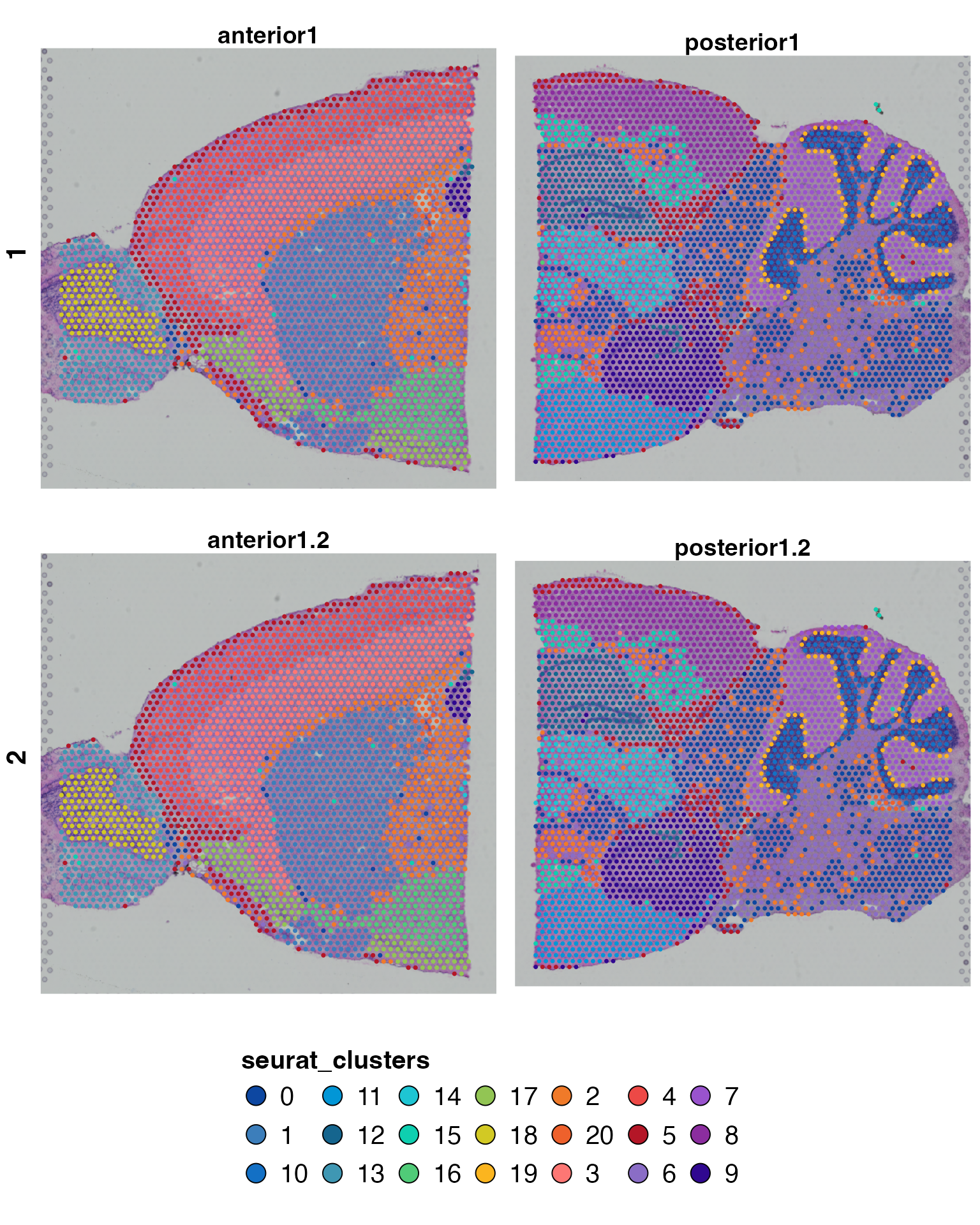
Each row of the output corresponds to one condition level. Columns
would correspond to levels of split.by if provided.
5. Colors from PrepObject vs custom
# Colors from PrepObject (default)
p1=PlotSpatialDimPlots(brain,
  group.by = "seurat_clusters")
## Spatial DimMap: seurat_clusters - 1x2
# Override with a custom palette
my_cols <- GetColors(brain, "seurat_clusters")
my_cols["0"] <- "#FF0000"  # re-color cluster 0

p2=PlotSpatialDimPlots(brain,
  group.by = "seurat_clusters",
  colors   = my_cols)
## Spatial DimMap: seurat_clusters - 1x2
p1+p2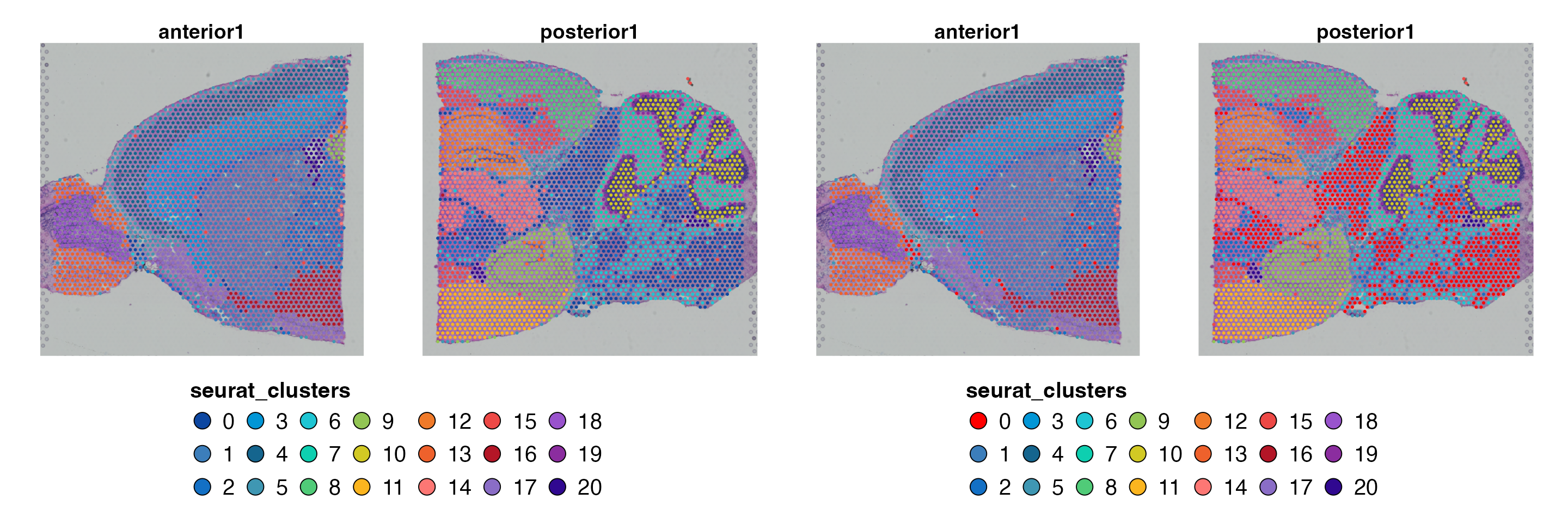
6. Saving to disk
#to automatically save on disk set PrepObject(AutoSavePlots = T)
PlotSpatialDimPlots(brain,
  group.by    = "seurat_clusters",
  output_dir  = tempdir(),
  object_name = "MouseBrain")
PlotSpatialFeaturePlots
1. Basic spatial gene expression
PlotSpatialFeaturePlots(brain,
  features = c("Hpca", "Ttr"),join_plots = T)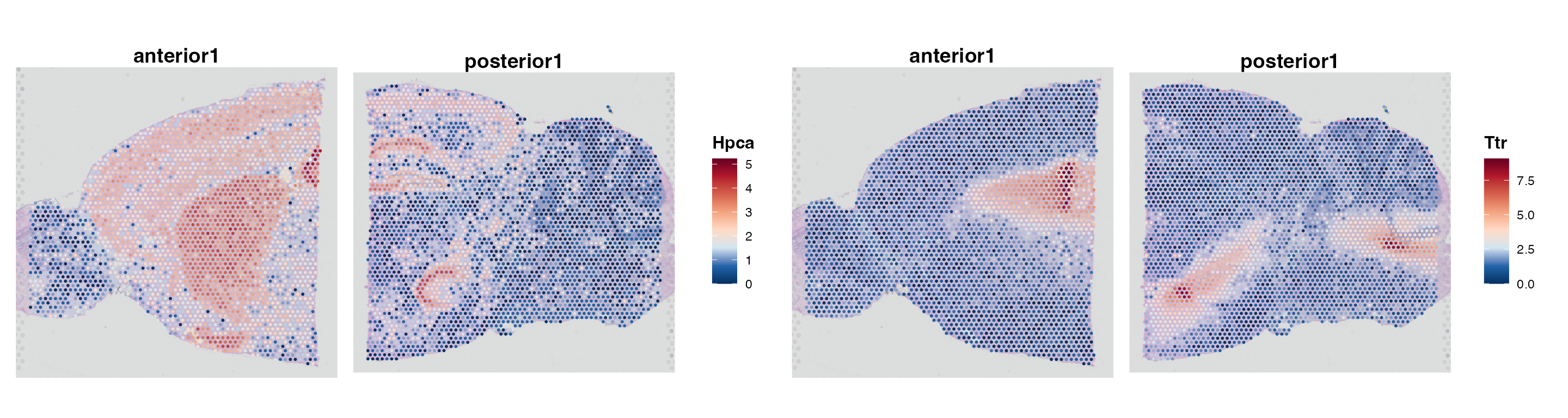
Each gene generates one spatial map. Spot color encodes normalized
expression from grey (zero) to the high-expression color (default: dark
red). Hpca marks hippocampal neurons; Ttr
marks the choroid plexus - both should appear in their expected
anatomical locations.
2. Metadata-driven layout
PlotSpatialFeaturePlots(braindouble,
  features      = c("Hpca", "Ttr"),
  layout_method = "metadata",
  row.by = "rep")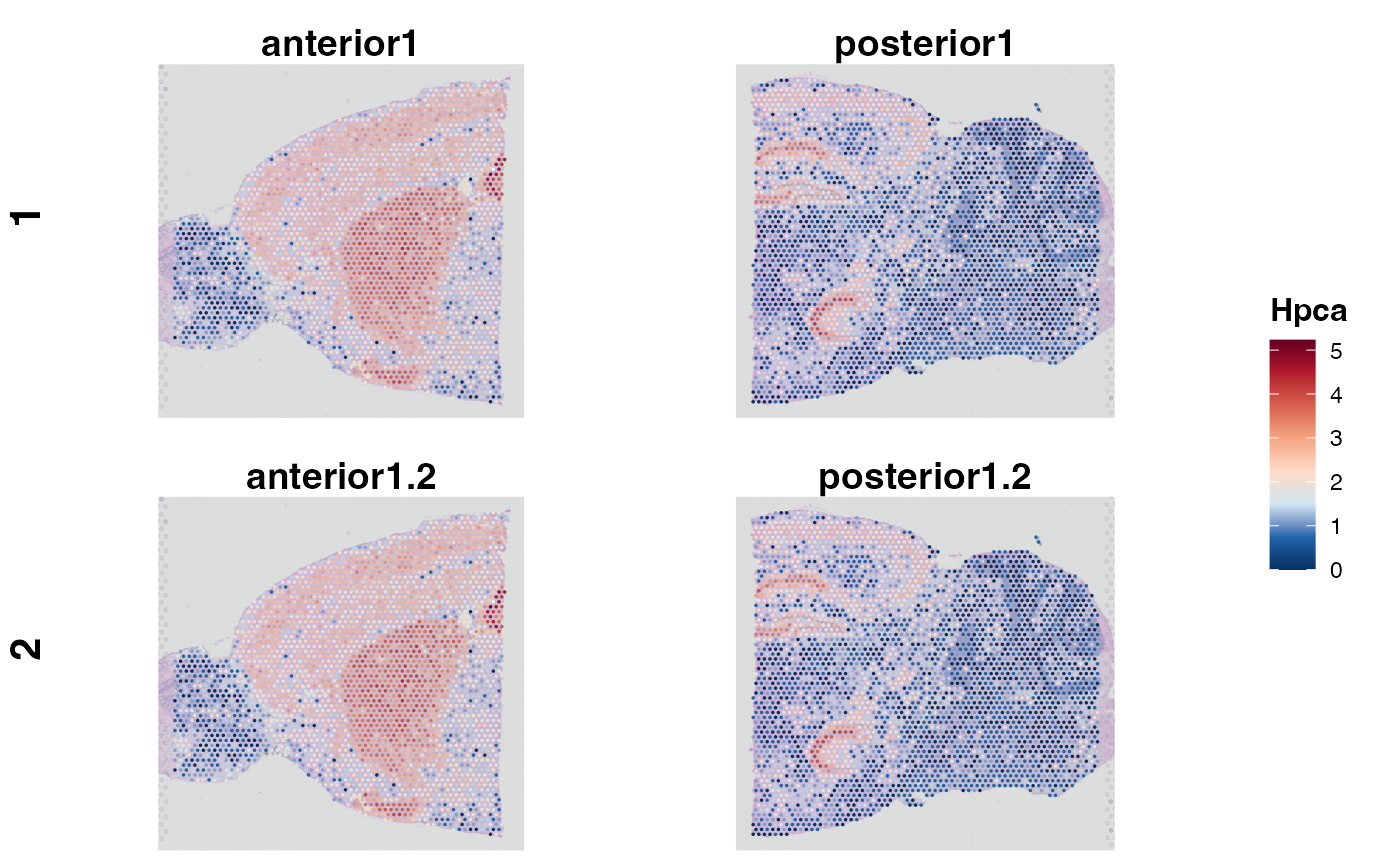
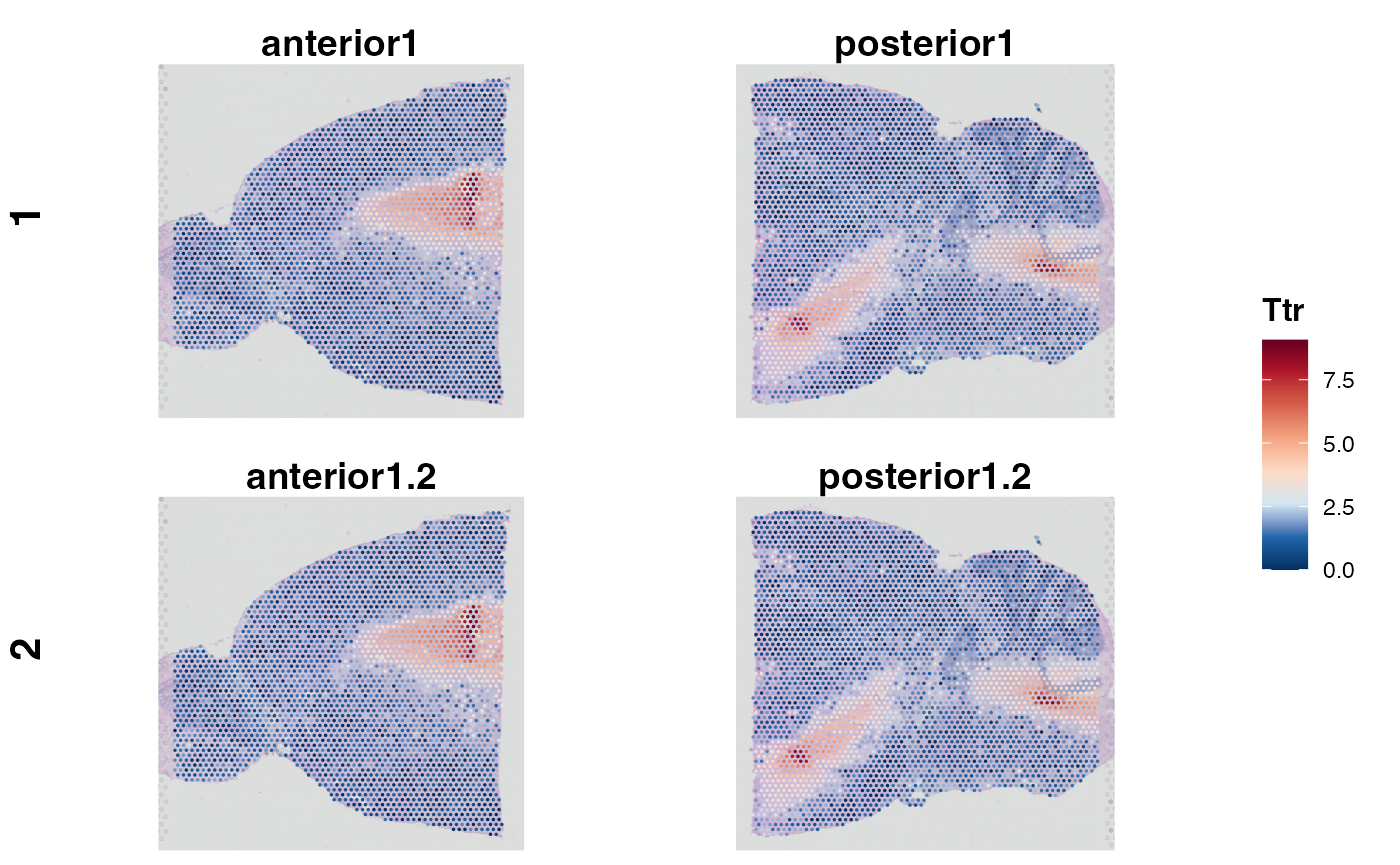
Rows correspond to the levels of Replicate. Each gene’s
spatial pattern is shown once per condition. This layout is most useful
for comparing expression between biological groups when each group
occupies a distinct tissue section in the same object.
3. Saving to disk
#to automatically save on disk set PrepObject(AutoSavePlots = T)

PlotSpatialFeaturePlots(brain,
  features    = c("Hpca", "Ttr"),
  output_dir  = tempdir(),
  object_name = "MouseBrain",
  subset_name = "AllRegions")
Files are named by gene:
e.g. MouseBrain_Anterior1_spatial_Hpca.pdf.
PlotMasterMaps
PlotMasterMaps is a composite figure function: for each
gene it assembles a multi-panel page containing the tissue spatial map,
a UMAP colored by the specified group.by, and a UMAP
colored by gene expression - all on one page, ready for a supplementary
figure or lab presentation.
1. Basic master map
PlotMasterMaps(brain,
  features   = c("Hpca"),
  group.by   = "seurat_clusters")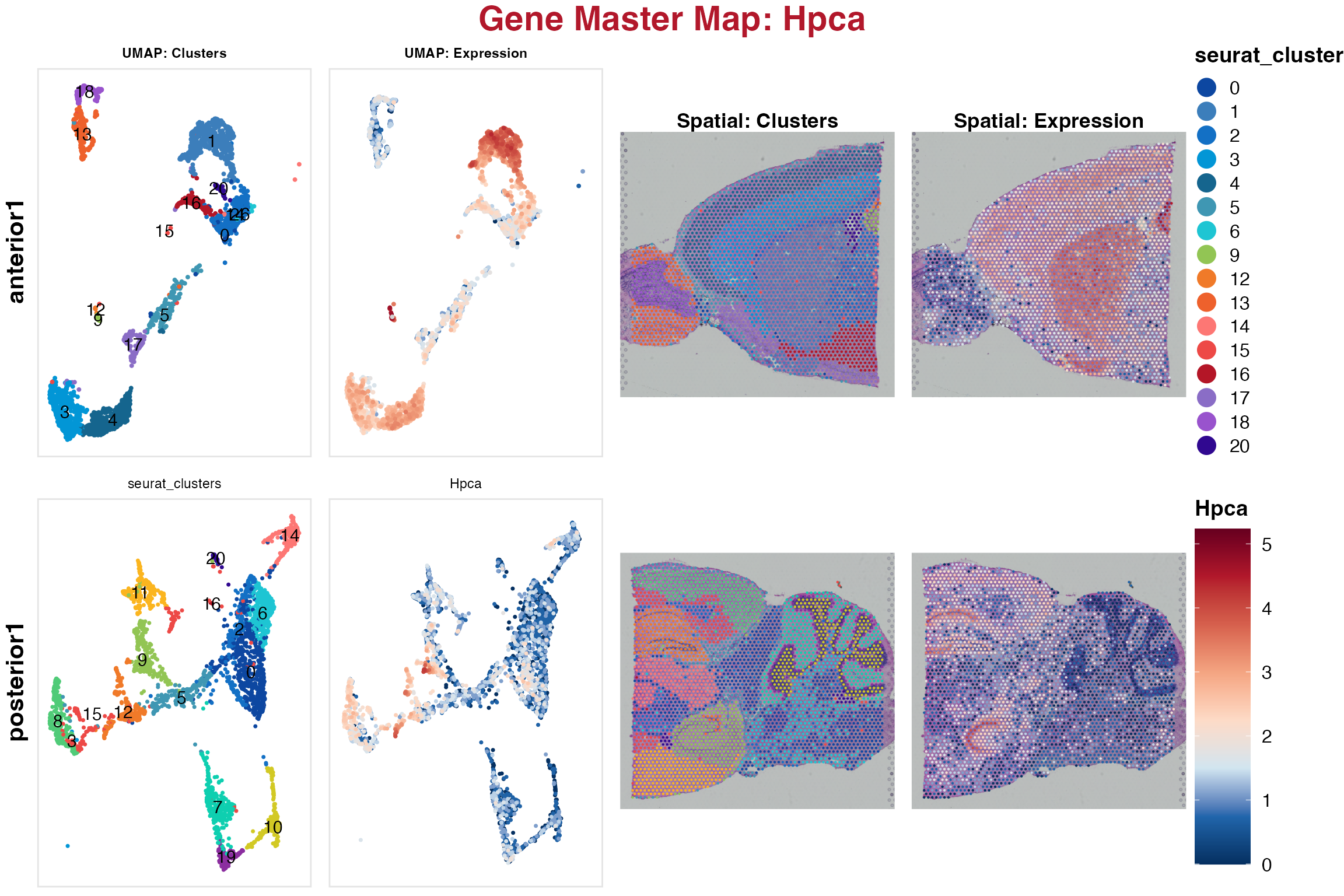
Each gene produces a PDF page with three panels arranged
horizontally: 1. Spatial expression map (spot colors = expression level)
2. UMAP colored by group.by (cluster) for orientation 3.
UMAP colored by gene expression
This lets you simultaneously see where in the tissue the gene is expressed and which clusters drive that expression.
2. Multiple group.by
PlotMasterMaps(brain,
  features   = c("Hpca", "Ttr"),
  group.by   = c("seurat_clusters", "Celltypes"),
  output_dir = tempdir())
Each combination of gene × group.by variable produces
its own panel page. With 2 genes and 2 group.by variables,
you get 4 pages.
3. Custom gene expression color scale
PlotMasterMaps(brain,
  features    = "Hpca",
  group.by    = "seurat_clusters",
  gene_colors = c("lightgrey", "#006837"),
  output_dir  = tempdir(),
  object_name = "MouseBrain")
gene_colors is a two-element vector: [1] is
the zero-expression color, [2] is the high-expression
color. The default is grey -> dark red.
Parameter reference - PlotSpatialDimPlots
| Parameter | Type | Default | Description |
|---|---|---|---|
group.by |
character (vector) | from PrepObject
|
Variable(s) to color spots by |
layout_method |
character | "auto" |
"auto" or "metadata"
|
row_var |
character | NULL |
Row-grouping variable (metadata layout) |
colors |
named character | NULL |
Override palette |
uniform_size |
logical | FALSE |
Use equal spot size |
output_dir |
character | NULL |
Directory for saving |
object_name |
character | "" |
Label used in filenames |
file_name |
character | NULL |
Override the auto-built saved file name |
timestamp |
logical | FALSE |
Append a _YYYYMMDD-HHMMSS stamp to the saved file name
so repeated runs are versioned instead of overwritten |
Parameter reference - PlotSpatialFeaturePlots
| Parameter | Type | Default | Description |
|---|---|---|---|
features |
character vector | required | Genes to plot |
layout_method |
character | "auto" |
"auto" or "metadata"
|
row_var |
character | NULL |
Row-grouping variable |
output_dir |
character | NULL |
Directory for saving |
object_name |
character | "" |
Label used in filenames |
subset_name |
character | "" |
Sub-label used in filenames |
file_name |
character | NULL |
Override the auto-built saved file name |
timestamp |
logical | FALSE |
Append a _YYYYMMDD-HHMMSS stamp to the saved file name
so repeated runs are versioned instead of overwritten |
Parameter reference - PlotMasterMaps
| Parameter | Type | Default | Description |
|---|---|---|---|
features |
character vector | required | Genes to visualize |
group.by |
character (vector) | "seurat_clusters" |
Variable(s) for the UMAP orientation panel |
colors |
named character | NULL |
Override UMAP cluster colors |
gene_colors |
character (length 2) | c("grey","darkred") |
Zero and max expression colors |
output_dir |
character | required | Directory for saving |
object_name |
character | "" |
Label used in filenames |
file_name |
character | NULL |
Override the auto-built saved file name |
timestamp |
logical | FALSE |
Append a _YYYYMMDD-HHMMSS stamp to the saved file name
so repeated runs are versioned instead of overwritten |
See also
- Vignette 01:
PrepObject- register spatial cluster colors - Vignette 03:
PlotDimPlots- UMAP-only equivalent for scRNA-seq - Vignette 04:
PlotFeaturePlots- scRNA-seq gene expression on UMAP