
scSidekick - Exploring Metadata & Composition
13_metadata_composition.RmdOverview
Before any fancy analysis, you usually just want to understand
your object: how many cells per sample, how cell-type composition
shifts between conditions, which donors carry which clinical features.
The base-R answer is a pile of nested table() calls and a
few dozen lines of dplyr + ggplot2.
scSidekick turns that into one-liners:
-
SummarizeMetadata()- collapse a giantmeta.datainto a tidy per-group summary table (counts, numeric means, categorical breakdowns). -
PlotMetaSummary()- composition as bar charts (counts and percentages) across one or more grouping levels, in a single call. -
PlotAlluvial(),PlotRose(),PlotChord(),PlotAtlasWheel()- a family of “at a glance” composition graphics for flows, proportions, relationships, and whole-atlas overviews.
library(scSidekick)
library(Seurat)
library(SeuratData)
library(ggforce)   # PlotAlluvial uses ggforce's parallel-sets stats
We use bmcite, a bone-marrow CITE-seq dataset (~30 k
cells) with rich metadata: lane, donor,
celltype.l1, and celltype.l2.
1. SummarizeMetadata() - one tidy table from messy
metadata
Point SummarizeMetadata() at one or more ID
columns and it returns one row per ID combination with: an
n_cells count, the mean of every numeric column, and a
compact breakdown of every categorical column - all the columns you
didn’t name are summarized automatically.
donor_summary <- SummarizeMetadata(bmcite, id_columns = "donor")
donor_summary[, 1:5]   # first few summary columns
## # A tibble: 2 × 5
## donor n_cells nCount_RNA nFeature_RNA nCount_ADT
## <fct> <int> <dbl> <dbl> <dbl>
## 1 batch1 14468 2779. 858. 4588.
## 2 batch2 16204 3116. 912. 4617.Numeric columns are aggregated with numeric_func
(default mean; pass median, max,
a custom function, …). Use several ID columns to summarize at a finer
grain:
ds <- SummarizeMetadata(bmcite,
                        id_columns   = c("donor", "celltype.l1"),
                        numeric_func = median)
head(ds[, c("donor", "celltype.l1", "n_cells", "nFeature_RNA")])
## # A tibble: 6 × 4
## donor celltype.l1 n_cells nFeature_RNA
## <fct> <fct> <int> <dbl>
## 1 batch1 B cell 1700 668
## 2 batch1 Mono/DC 3845 838
## 3 batch1 NK 615 715
## 4 batch1 Progenitor cells 1518 1394.
## 5 batch1 T cell 6790 701
## 6 batch2 B cell 2053 710This is the everyday “what’s actually in my object?” answer - and it scales: on a multi-million-cell atlas you can collapse to one row per donor in seconds.
2. PlotMetaSummary() - composition at a glance
The most common request - how does cell-type composition differ
between samples? - is one call. variables is what
you’re counting, fill_variable colors the stack, and
count_unit = "cells" counts cells (vs donors).
PlotMetaSummary(bmcite,
  variables     = c("celltype.l1", "celltype.l2"),
  fill_variable = "donor",
  count_unit    = "cells")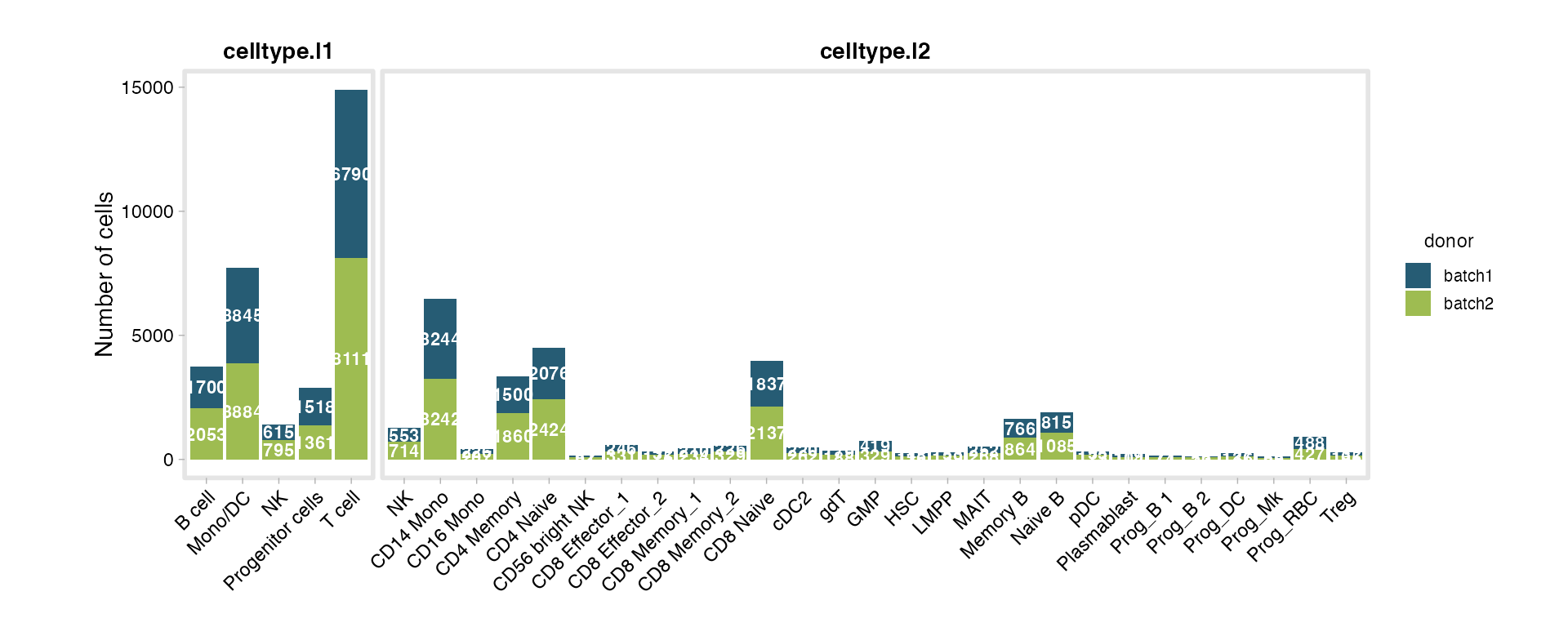
Add percent = TRUE for normalized composition - ideal
when group sizes differ:
PlotMetaSummary(bmcite,
  variables     = c("celltype.l1", "celltype.l2"),
  fill_variable = "donor",
  count_unit    = "cells",
  percent       = TRUE)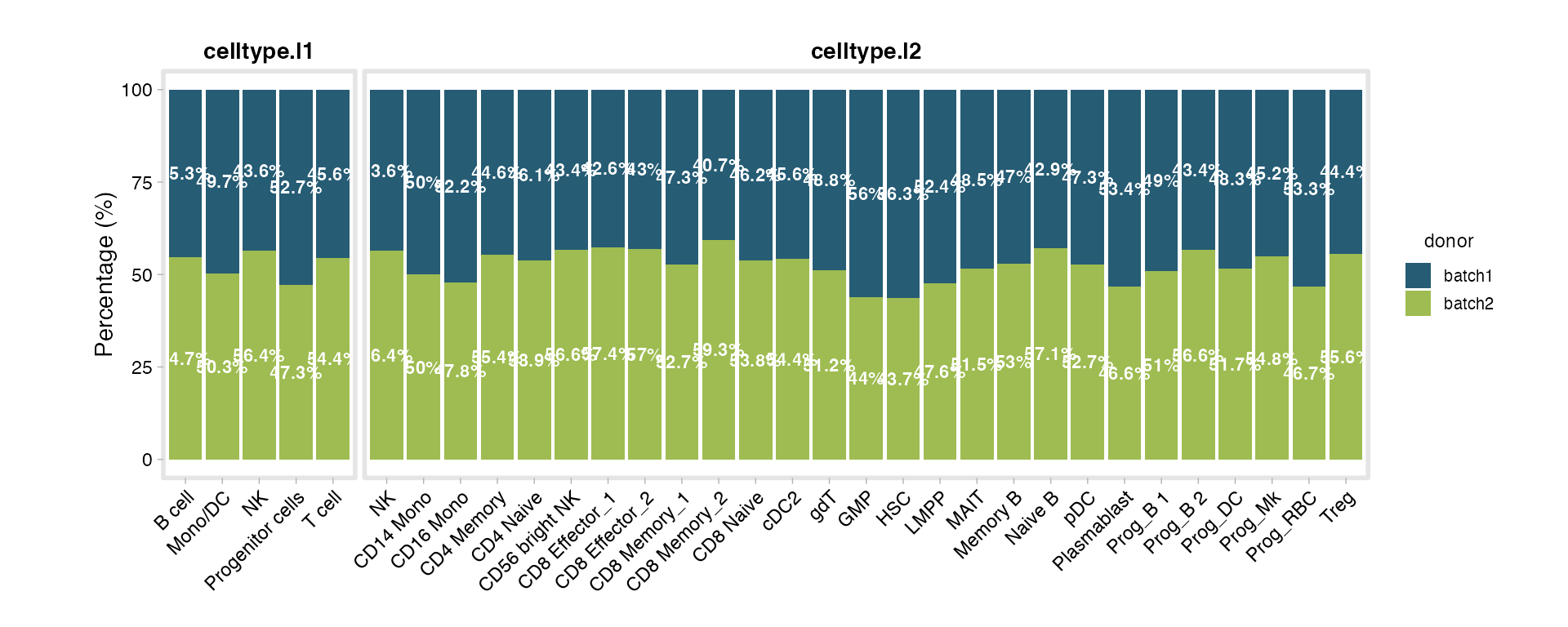
Donor-level summaries with id_column
For clinical datasets you usually want per-donor
counts, not per-cell. Setting id_column collapses cells to
donors first, then lays out the variables - and
row_variable facets into rows. This is exactly how you’d
summarize a large patient cohort (e.g. Braak / APOE / CERAD by sex):
# Illustrative - for a clinical atlas `md` with one row per cell:
PlotMetaSummary(md,
  id_column     = "Donor.ID",
  variables     = c("Braak", "APOE.Genotype", "CERAD.score"),
  fill_variable = "Cognitive.Status",
  row_variable  = "Sex")
The same function call handles a 30 k-cell demo and a 1.8 M-cell, 150-column clinical atlas - it just collapses to the unit you ask for.
When output_dir is set, the auto-built file name
reflects every grouping variable in the call - including
row_variable - so a Sex-stratified run never
overwrites the unstratified one. file_name overrides the
auto-built name outright, and timestamp = TRUE appends a
_YYYYMMDD-HHMMSS stamp instead, so repeated runs are
versioned rather than overwritten:
PlotMetaSummary(md,
  id_column     = "Donor.ID",
  variables     = c("Braak", "APOE.Genotype", "CERAD.score"),
  fill_variable = "Cognitive.Status",
  row_variable  = "Sex",
  output_dir    = "./Figures",
  timestamp     = TRUE)
3. Composition chart family
Bar charts aren’t always the clearest view. scSidekick ships four complementary “at a glance” graphics.
PlotAlluvial() - flows across categories
Alluvial plots show how cells flow between two or more categorical axes - great for “which donors contribute to which cell types”.
PlotAlluvial(md,
  axes = c("donor", "celltype.l1"))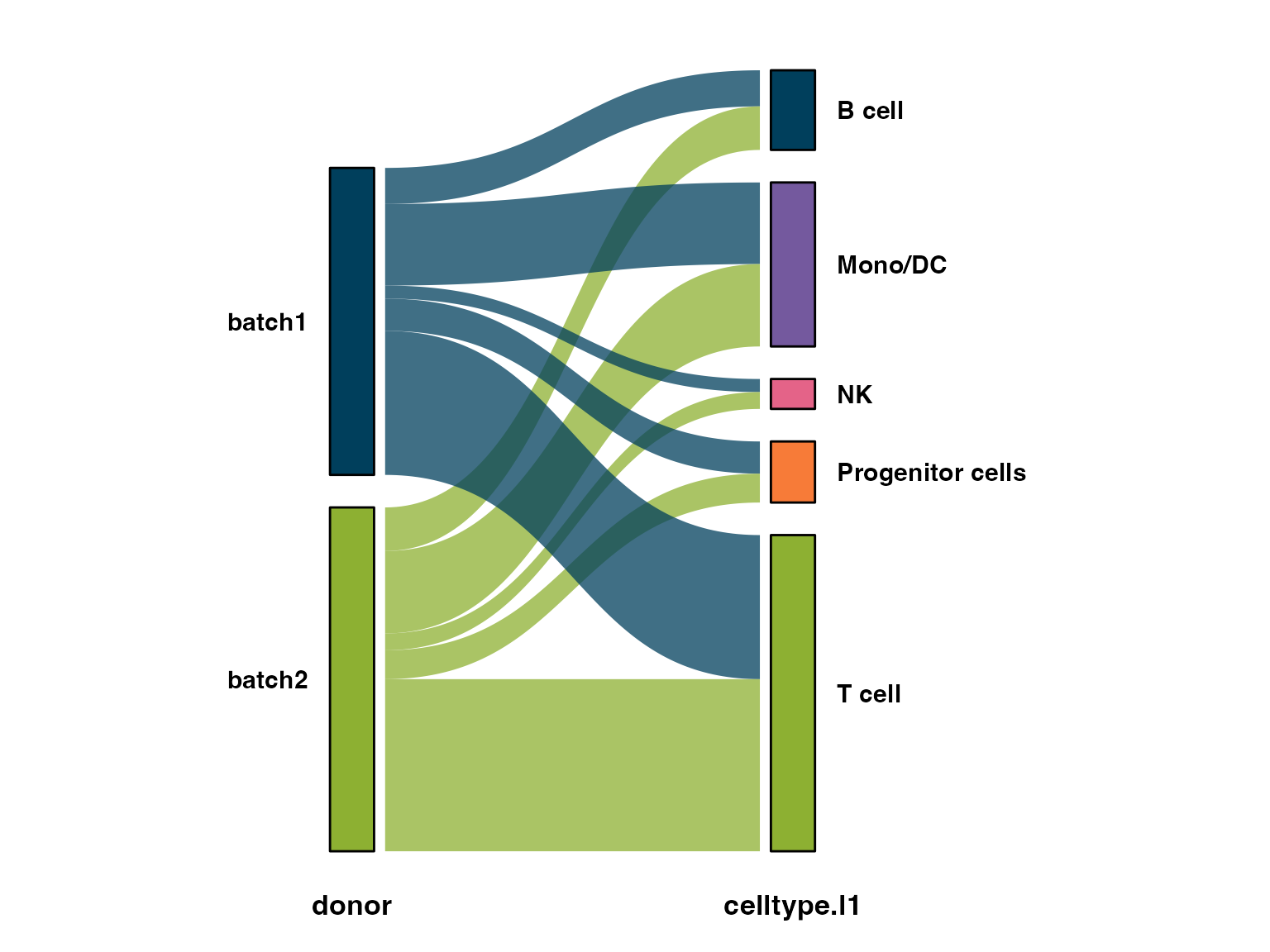
PlotRose() - circular composition
A polar/“rose” chart of composition per group - a compact alternative to stacked bars.
PlotRose(md,
  stat.by = "celltype.l1",
  group.by = "donor")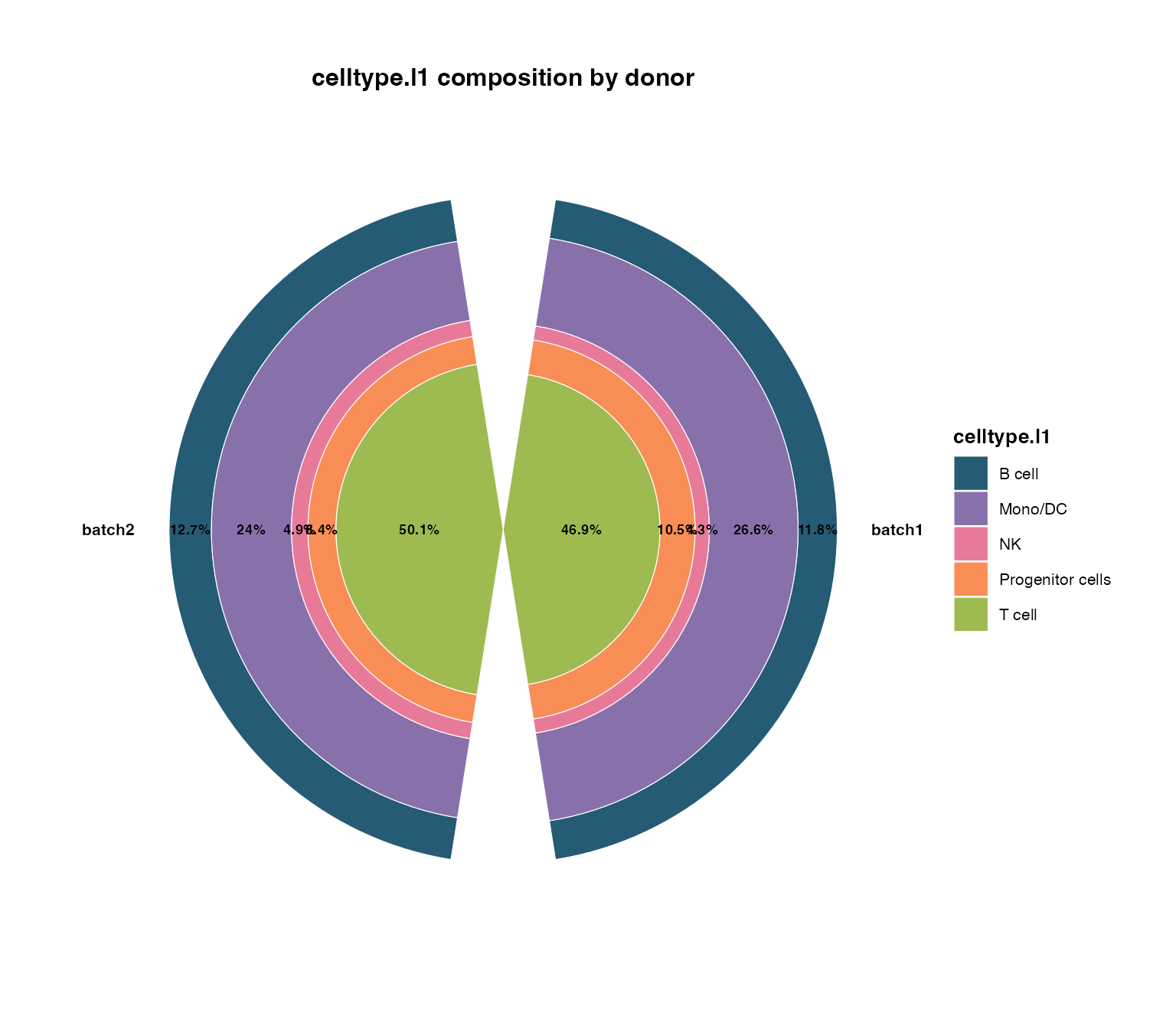
PlotChord() - relationships between two variables
Chord diagrams emphasise the pairing between two
categoricals (here, which cell types appear in which donors).
PlotChord() uses circlize under the
hood.
PlotChord(md,
  var1 = "donor",
  var2 = "celltype.l1")
PlotAtlasWheel() - whole-dataset overview
For multi-study atlases, PlotAtlasWheel() draws a single
“cover figure” summarizing cells per group across studies and patients -
counts in the centre, a wheel of wedges around it. (Shown as a template;
it needs study/patient columns that bmcite doesn’t
carry.)
PlotAtlasWheel(meta,
  group.by = "CellType",
  study_by   = "Study",
  patient_by = "Patient.ID",
  title      = "My Atlas",
  cell_label = "Cells")
See also
- Vignette 01:
PrepObject()- register the colors these charts reuse - Vignette 03:
PlotComposition()/PlotTrendLabeled()- composition trends on the UMAP - Vignette 14: large-data workflows (BPCells / sketch / pseudobulk) for summarizing massive objects
Session info
## R version 4.3.1 (2023-06-16)
## Platform: aarch64-apple-darwin20 (64-bit)
## Running under: macOS 15.6
##
## Matrix products: default
## BLAS:   /Library/Frameworks/R.framework/Versions/4.3-arm64/Resources/lib/libRblas.0.dylib
## LAPACK: /Library/Frameworks/R.framework/Versions/4.3-arm64/Resources/lib/libRlapack.dylib;  LAPACK version 3.11.0
##
## locale:
## [1] en_US.UTF-8/en_US.UTF-8/en_US.UTF-8/C/en_US.UTF-8/en_US.UTF-8
##
## time zone: America/Chicago
## tzcode source: internal
##
## attached base packages:
## [1] stats     graphics  grDevices utils     datasets  methods   base
##
## other attached packages:
##  [1] ggforce_0.4.2             ggplot2_4.0.3
##  [3] stxBrain.SeuratData_0.1.2 pbmc3k.SeuratData_3.1.4
##  [5] panc8.SeuratData_3.0.2    ifnb.SeuratData_3.1.0
##  [7] bmcite.SeuratData_0.3.0   SeuratData_0.2.2
##  [9] Seurat_5.2.1              SeuratObject_5.1.0
## [11] sp_2.1-3                  scSidekick_1.2.0
##
## loaded via a namespace (and not attached):
##   [1] RColorBrewer_1.1-3     shape_1.4.6.1          rstudioapi_0.16.0
##   [4] jsonlite_2.0.0         magrittr_2.0.3         spatstat.utils_3.1-0
##   [7] farver_2.1.2           rmarkdown_2.29         GlobalOptions_0.1.2
##  [10] fs_1.6.6               ragg_1.4.0             vctrs_0.6.5
##  [13] ROCR_1.0-11            spatstat.explore_3.2-7 htmltools_0.5.8.1
##  [16] sass_0.4.10            sctransform_0.4.1      parallelly_1.37.1
##  [19] KernSmooth_2.23-22     bslib_0.9.0            htmlwidgets_1.6.4
##  [22] desc_1.4.3             ica_1.0-3              plyr_1.8.9
##  [25] plotly_4.10.4          zoo_1.8-14             cachem_1.1.0
##  [28] igraph_2.0.3           mime_0.13              lifecycle_1.0.4
##  [31] pkgconfig_2.0.3        Matrix_1.6-5           R6_2.6.1
##  [34] fastmap_1.2.0          fitdistrplus_1.1-11    future_1.33.2
##  [37] shiny_1.11.1           digest_0.6.37          colorspace_2.1-1
##  [40] patchwork_1.3.1        tensor_1.5             RSpectra_0.16-1
##  [43] irlba_2.3.5.1          textshaping_0.3.7      labeling_0.4.3
##  [46] progressr_0.14.0       spatstat.sparse_3.0-3  httr_1.4.7
##  [49] polyclip_1.10-6        abind_1.4-8            compiler_4.3.1
##  [52] withr_3.0.2            S7_0.2.0               fastDummies_1.7.3
##  [55] highr_0.10             MASS_7.3-60.0.1        rappdirs_0.3.3
##  [58] tools_4.3.1            lmtest_0.9-40          otel_0.2.0
##  [61] httpuv_1.6.16          future.apply_1.11.2    goftest_1.2-3
##  [64] glue_1.8.0             nlme_3.1-164           promises_1.5.0
##  [67] grid_4.3.1             Rtsne_0.17             cluster_2.1.6
##  [70] reshape2_1.4.4         generics_0.1.4         gtable_0.3.6
##  [73] spatstat.data_3.0-4    tidyr_1.3.1            data.table_1.15.4
##  [76] utf8_1.2.6             spatstat.geom_3.2-9    RcppAnnoy_0.0.22
##  [79] ggrepel_0.9.6          RANN_2.6.1             pillar_1.11.0
##  [82] stringr_1.5.1          spam_2.10-0            RcppHNSW_0.6.0
##  [85] later_1.4.2            circlize_0.4.16        splines_4.3.1
##  [88] tweenr_2.0.3           dplyr_1.1.4            lattice_0.22-6
##  [91] survival_3.5-8         deldir_2.0-4           tidyselect_1.2.1
##  [94] miniUI_0.1.1.1         pbapply_1.7-2          knitr_1.45
##  [97] gridExtra_2.3          scattermore_1.2        xfun_0.52
## [100] matrixStats_1.2.0      stringi_1.8.7          lazyeval_0.2.2
## [103] yaml_2.3.10            evaluate_0.23          codetools_0.2-20
## [106] tibble_3.3.0           cli_3.6.5              uwot_0.1.16
## [109] xtable_1.8-4           reticulate_1.42.0      systemfonts_1.3.2
## [112] jquerylib_0.1.4        dichromat_2.0-0.1      Rcpp_1.1.0
## [115] globals_0.16.3         spatstat.random_3.2-3  png_0.1-8
## [118] parallel_4.3.1         pkgdown_2.1.3          dotCall64_1.1-1
## [121] listenv_0.9.1          viridisLite_0.4.2      scales_1.4.0
## [124] ggridges_0.5.6         purrr_1.0.4            crayon_1.5.2
## [127] rlang_1.1.6            cowplot_1.2.0.9000